Thursday, November 8, 2012
In-Page Analytics Improvements in Google Analytics
Saturday, November 3, 2012
Automate GA Reports, Create Visualizations and Build Dashboards | API, Apps Script
Google analytics data can be pulled into Apps script supported products such as Google Docs, Sites, or Spreadsheets using GA API. This integration dramatically reduces the manual work required to pull Google Analytics data and you can utilize all the great features of Google Spreadsheets, such as easy sharing, collaboration, automation, charting and visualization tools.
Components of Integration
- Application Registration to Generate API Key
- Enabling API in Google Script
- Google Script Installation
- Querying GA Data
- Creating Reports, Automation and Building Dashboards
- Create GA reports using Google spreadsheet
- Define & automate reporting tasks – Minutes / Hours / Days / Weeks / at any specified date
- Access GA data by writing queries in spreadsheet, without logging to Google Analytics UI
- Multiple queries to pull GA data can be made simultaneously from Google spreadsheet
- Create new visualizations
- Build Dashboards
- Pull any dimensions and metrics easily to the spreadsheet, even the ones that are not available in Google analytics UI
- Kill the limitations of being able to pull only 2 dimensions at a time
Event Tracking and Virtual Page View Tracking Impacts the Bounce Rate
Example:
Page A has a bounce rate of 90% before implementing the event tracking for the video displayed in the webpage. Subsequent to the implementation of event tracking code, the page will show a declined bounce rate because Google Analytics started considering it as an interaction event contrary to the consideration of the video as an non-interaction event before event tracking implementation.
This would give an entirely different picture to the client, indeed a wrong notion that the page is performing better now compared to how it were earlier. Fix this the abnormal decline in bounce rate by telling Google to just consider the video as an non-interactive event. For that
Capitalize the fabulous feature in GA event tracking called "non-interaction events", wherein you can mark an event as a non-interaction by passing
true as a fifth argument (or, 6th item in the array)._gaq.push(["_trackEvent", "Category", "Action", "Label", 3, true]);
From Google Analytics Help Page:
_trackEvent() method. This parameter allows you to determine how you want bounce rate defined for pages on your site that also include event tracking. For example, suppose you have a home page with a video embedded on it. It's quite natural that you will want to know the bounce rate for your home page, but how do you want to define that? Do you consider visitor interaction with the home page video an important engagement signal? If so, you would want interaction with the video to be included in the bounce rate calculation, so that sessions including only your home page with clicks on the video are not calculated as bounces. On the other hand, you might prefer a more strict calculation of bounce rate for your home page, in which you want to know the percentage of sessions including only your home page regardless of clicks on the video. In this case, you would want to exclude any interaction with the video from bounce rate calculation.opt_noninteraction parameter steps in. Remember that a bounce is defined as a session containing only one interaction hit. By default, the event hit sent by _trackEvent() is considered an interaction hit, which means that it is included in bounce rate calculations. However, when this value is set totrue, the type of event hit is not considered an interaction hit. You can use this fact to adjust bounce rate calculations for pages that contain events. Setting this value to true means: a session containing a single page tagged with non-interaction events is counted as a bounce—even if the visitor also triggers the event during the session. Conversely, omitting this option means that a single-page session on a page that includes event tracking will not be counted as a bounce if the visitor also triggers the event during the same session.Saturday, October 27, 2012
Free GA Scripts and API for Automating Reports in Google Docs Presentation, PPT
Saturday, October 20, 2012
Google Analytics Real Time Data Obeys Profile Filters
Google announced these changes through their blog. Read the blog post here.
Friday, October 19, 2012
Defining the GA API Query Parameters - Google Analytics API
GA Report Automation using API Powered Scripts - It's Easy
Sunday, April 1, 2012
Monday, June 7, 2010
Search Analytics and Google Https | Future of Web Analytics is in ?
The search query and referrals details would be blind to all web analytics tools when an users searches through https://www.google.com. This critical piece vital information enlightening marketers would be lost.....for users arriving at your website through https://www.google.com.. Read More Search Analytics and Google Https
Wednesday, March 3, 2010
Google Analytics Certification Value and Merits Compared to Omniture Sitecatalyst / Web Trends / Core Metrics
My friends Prateesh and Muthalagu working for Comodo Security Solutions have been awarded Google Analytics Individual Qualification (IQ) Certification today. Considering the growth of Google analytics as an Enterprise class web analytics tool and it ability to compete with Omniture Sitecatalyst / Web Trends / Core Metrics, this is a honorable achievement.
Congrats - Prateesh and Muthalagu!
Tuesday, February 23, 2010
Major Drawback of Google Analytics when Compared with Omniture and CoreMetrics
This is a major issue because the ultimate objective of an ecommerce site is sales. Knowing the keywords and referring sources that reasoned the sales is the foremost valuable thing for a website owner, a great clue for repeating the sales.
Websites using Google analytics will get only the keywords and referring sources used by people who purchased the product, the last time they visited the website.. Can Google Analytics maintain it Enterprise Class here also ? YES IT CAN. Here is a way to track the first click with Google analytics..thanks to Patrick Altoft, Director of Search at Leeds based digital & SEO agency Branded3 for providing a simple hack to help Google Analytics maintain its high standards against Omniture and CoreMetrics.
Read the full post here..
Patrick Altoft is Director of Search at Leeds based digital & SEO agency Branded3.
Google Analytics Discussions on Important topics in a Video
- Avoid spammed pageviews in Google Analytics
- Gather ecommerce tracking variables on 3rd party shopping carts.
- Issues popping up on maintaining campaign information on 3rd party shopping carts.
- Competitors links showing up in your referring sources
- Locate Singapore in map overlay of Google Analytics
- View referring URLs in the campaign report
- Google Analytics $Index metric.
- Event tracking and bounce rate
Thursday, February 18, 2010
US Federal Government Approves Google Analytics | Best Recognition for the Great Enterprise Tool (FREE)
apps.gov web site is a place where US government agencies and services could find approved cloud computing applications.
Congrats Google Analytics Team for adding another feather to your cap!
Wednesday, February 17, 2010
Free Enterprise Web Analytics Tool Google Analytics vs Ominiture Site Catalyst | WebTrends | ClickTracks
Benefits:
Excellent tool to track and report on all visitor interactions.
- Know what your visitors are doing and understand their behaviour
- Gather knowledge on improving your website interms of design, navigation, content, relevancy etc.
- Track the performance of your marketing campaigns
- Track PPC campaigns (Google Adwords, Yahoo Search Marketing, MSN Adcenter, Miva etc.)
- Track conversions to find ways for improvement
- Increase ROI with the great insights provided by the tool
Features:
- Crystal clear geographic reports
- Tracking internal site search
- Automatic Adwords integration by turning on 'Auto Taggin' in Google Adwords account
- Paid and free keywords performance
- Tracking the performance of marketing campaigns.
- Integration with Adsense
- Track up to 20 goals in a single profile
- Ecommerce reporting
- Tracking Mobile visitors
- Tracking performance of videos (Event Tracking)
- Flash tracking
- Tracking Social network applications
- Custom dashboards report
- Advanced segmentation
- Custom report
- Intelligence alerts
- Multi-dimensional analysis
- Funnel visualization
- Click stream analytics via navigational summary
- Entrance path analysis
- Referral sources report
- Tracking clicks on buttons,links,banners,images,videos,flash etc.
- Tracking form pages
- Hourly campaign performance
- Hourly keyword performance
- Track multiple sub-domains in a single profile
- Track multiple domains in a single profile
- Track multiple domains and sub-domains in a single profile
- Identify the best performing pages
- Identify poorly performing pages
- Click heat mapping via Site overlay
- Email campaign tracking
- Banner campaign tracking
- Compare your websites performance with other websites in the Internet
- Integration of Google Website optimizer to carry out A/B testing and Multi-variate testing
- ABOVE ALL- ABILITY TO CUSTOMIZE THE CODE TO GET THE DATA YOU REQUIRE
Security of your data:
Google stores all your data in their server. The data would never be disclosed / shared with anyone, Google assures this! Since World-class tool is offered for free why to pay big bucks to subsribe for Omniture site catalyst / Web Trends / ClickTracks which do not have more features than the mighty Free Google Analytics.
But please note that none of the web analytics tools are error free.
Wednesday, March 18, 2009
Tagging Email Campaign Links for Measuring the Success of the Campaign
If your answer is 'Yes' for the first question and 'No' for the second question.. then you would find this post helpful.
Tagging email campaigns links would supply you with the statistics of visitors activities after they enter you web pages by following the link in your email campaign. Campaign tags can be created very easily using Google's URL builder tool and tracking the visitor stats can be done using Google analytics, a free and powerful web analytics tool.
Understand your email campaign prospects behavior using Google Analytics.
Using email marketing solutions like Campaign Monitor, MailChimp, VerticalResponse and AWeber will automatically tag your campaign links.
Saturday, March 7, 2009
Remove Duplicates Created by Tracking Parameters Using Canonical URL Tag
Tracking parameters facilitates distinction of paid advertisements from other traffic sources. But an issue could pop up anytime while using these parameters in the form of search engine indexing both your urls which includes your original url as well. This is as if you are having a duplicate url for your main url.
Putting a 301 redirect from duplicate url to original url would eliminate your chances of tracking the paid advertisements. So what are you going to do now? Don't worry there is way to fix this issue. Adding a canonical url tag to your duplicate page by specifying the original url can wipe of all your concerns.
By including a canonical url tag you are informing the search engines about your original url. Search engines not only leave out the duplicate page from its index but also transfers all the search engine metrics to the original url.
Tuesday, February 24, 2009
Track Mobile Visitors Using Google Analytics
Google analytics tracks visitors from mobiles that supports full browsers (supports HTML & analytics tools). Google analytics reports visitors from iPhone, the T-Mobile G1, and other mobile devices with full (HTML) Internet browsers. To know whether a particular mobile supports full browsers check the manufacturers website for information.
Reference Links:
Track Phone Calls and Live Chat Using Google Analytics

Mongoose metrics and LivePerson have integrated their products with GA.
To track conversions occurring on the website we look for the completed online forms,orders placed pages etc. But how do you track the conversions that happens offline. For example a customer pick up the phone and dials your company for seeking information or for placing an order. Now wipe off your worries and give an astonishing look at Mongoose metrics.
Mangoose metrics sells low cost toll numbers and gives you insights on the full numbers of dialled calls to your company in your Google analytics profiles. Each call is reported in GA as a visit!!!!!

LivePerson is a customer support live chat tool. It reveals the intentions of visitors chatting with the customer support persons. Below are the metrics that would be reported in your GA profile.
1) Conversion rate.
2) Geographic region of the LIVE chat.
3) Sources and keywords report.
4) Reverse Goal Path Report- Navigation path of visitors
Reference URL:
http://analytics.blogspot.com/2009/02/two-cool-integrations-telephone-leads.html
Sunday, February 15, 2009
Top and Popular Google Analytics Hacks and Filters Set Up Instructions
Google analytics is a robust and flexible free web analytics tool. Even after having the capability to compete with the best paid web analytics tools available in the market; Google analytics is offered free of cost.
Google analytics is a page tagging tool, just adding few lines of codes to the web pages is enough to get a detailed visitor statistics in your Google analytics account. Google analytics has got powerful filters and these filters makes this product an even better web analytics tool.
Following are the usefulness of setting up filters & adding additional lines to the Google analytics code:
Top Google Analytics Hacks:
(1)Include my website traffic only
Your GA code is vulnerable to be copied by others to have in their websites. This would make your GA reports show not only the data belonging to your domains but also others. The only way to avoid this is to have the following filer.
Filter set up steps:
Enter Filter Name: Include My Site Traffic
Filter Type: Select Custom from the drop down menu
Choose Custom Type: Select Include from the radio buttons
Filter Field: Select Hostname from the drop down menu
Filter Pattern: Enter ^yourdomainname\.com$
Choose Case Sensitive: Decide whether you want the filter to be case sensitive or not
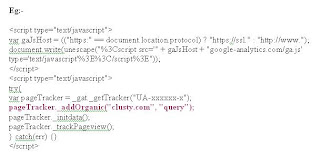
(2)Expand the list of search engines in your GA reports and also get the list of keywords triggered.(Please note that Google only recognizes a set of search engines).
Code to include in the webpage:
pageTracker._addOrganic("search_engine_domain", "query_parameter_name");
If you want to track the search engine clusty.com and the query that leads the searchers to your website. Open your browser go to Clusty.com and type a query "web analytics." The following would be the search URL you would be seeing.
http://clusty.com/search?input-form=clusty-simple&v%3Asources=webplus&query=web+analytics
The line of code to be added along with the GA code in the webpages has been mentioned below.
pageTracker._addOrganic("clusty.com", "query");
(3)Label your visitors
(4)Finding Google Image search keywords.
Filter set up steps:
1)Click "Add new filter for profile.
2)Specify a name for your profile.
3)From the drop down select custom filter
4)Select Include below the custom filter
5)Select Referral from the filter drop down.
6) Add the follwing ^http:\/\/images\.google\..*$ to the filter pattern field.
7) Mark Case sensitive as 'No'.
Thats ALL.. Click Finish! Check for the data after 24 hrs.....
(5)Full view of regional search engines.
(6)Identify you full set of keywords enabled for broad match keywords.
Google analytics do not show the keywords triggered for the broad match bid terms. This is indeed a cause to worry since people would trigger unrelated keywords to reach your website and walk back empty handed because of umpteen variations of the broad match term. Even the search query performance report in Adwords will show only part of keywords triggered for broad match term and labels rest of keywords as "Unique queries." You could be wasting hell lot of money for the unrelated keywords enabled for broad match term. You can block the unrelated keywords using "negative match" by knowing what are all the keywords enabled for broad match keywords.
To make this a reality you need to set two filters in your desired profile and you can see all the keywords triggered for your broad match bid terms.
Filter set up steps:
1) First Filter Creation Set Up Steps:
Field A -> Extract A: Referral: (\?|&)(q|p|query)=([^&]*)
Field B -> Extract B: Campaign Medium: (cpc|ppc)
Output To -> Constructor: Custom Field 1: $A3
2) Second Filter Creation Set Up Steps:
Field A -> Extract A: Custom Field 1: (.*)
Field B -> Extract B: Campaign Term: (.*)
Output To -> Constructor: Campaign Term: $B1 ($A1)
(7)Track your 404 pages
(8)Identifying identical links in Site overlay
(9)Track PPC Referring websites
(10)Receive details of Souce, medium and keywords for transactions.
(11)Track clicks to downloads.
(12)Import GA data to your CRM sysytems.
(13)Track Full Referral URLs.
Filter set up steps:
1)Click "Add new filter for profile.
2) Name your profile
3)From the drop down select custom filter
4)Select Advanced from the radio buttons
5)Field A -> Extract A: Select Referral from the drop down menu and enter (.*) in the text field. (.*) is specified to receive the full URLs.
6)Field B -> Extract B: Just Leave it blank.
7)Output To -> Constructor: Choose User Defined from the drop down menu and write $A1 in the text field.
8)Field A: Select Yes
9)Field B: Select No
10)Override Output Field: Select Yes
11)Case Sensitive: Select No
(14) Exclude internal visits.
Find your IP address and set filter to exclude it. Please make sure to escape the full stops with backslashes.
Filter set up steps:
Filter Name: Exclude Internal IP Addresses
Filter Type: Select Exclude "All Traffic From An IP Address" from the drop down menu
IP Address: IP Address or IP Address Range
(15) Track multiple domains & subdomains
Filter set up steps:
Name: Full URI
Type: Custom filter - Advanced
Field A -> Extract A: Hostname > (.*)
Field B -> Extract B: Request URI > (.*)
Output To -> Constructor: Request URI > /$A1$B1
We also need to tweak the GA a little bit to track the top level domains and sub-domains.
(16) Track Ecommerce Transactions
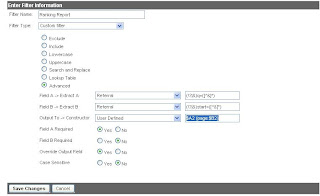
(17)Google analytics can tell in which search result pages your keywords are ranking.
Follow the steps in the below portrayed screenshots. Click on the screenshots to zoom it.
Wednesday, January 21, 2009
Mobile Web Analytics Bango
There are two implementations:
1.Campaign tracking which enables you to get a independent measurement of
all your mobile marketing and advertising campaigns and their success.
2. PAGE TRACKING which enables you to track what users are doing on your
mobile sites, who your visitors are and where they are coming (similar
to Google Analytics but for mobile).
Bango Analytics gives you answers to the following questions:
· How many unique visitors had you had (rather than just visits)?
· Which country and operator are your visitors from?
· How many times have they visited your mobile site?
· What content do they like?
· Which search engine or advertisement have they come from?/Best ROI
· How much money have they spent?
Read the review of Bango mobile web analytics tool.